Credit Card Management
Secure payment processing and credit card transaction management for real estate professionals
Overview
The Credit Card Management module in Agent Teammate CRM helps real estate professionals securely store payment methods, process transactions, and track business expenses. Integrate credit card transactions with expense tracking for comprehensive financial management.
Key Features
Secure Payment Management
- Secure Storage: PCI-compliant storage of credit card information
- Multiple Cards: Manage multiple business and personal credit cards
- Transaction Sync: Automatic synchronization with credit card statements
- Expense Categorization: Automatically categorize credit card expenses
- Receipt Matching: Match transactions with uploaded receipts
- Fraud Protection: Monitor for suspicious transactions
- Reporting: Detailed credit card spending reports
- Client Payments: Accept payments from clients securely
- Integration: Connect with popular credit card providers
Adding Credit Cards
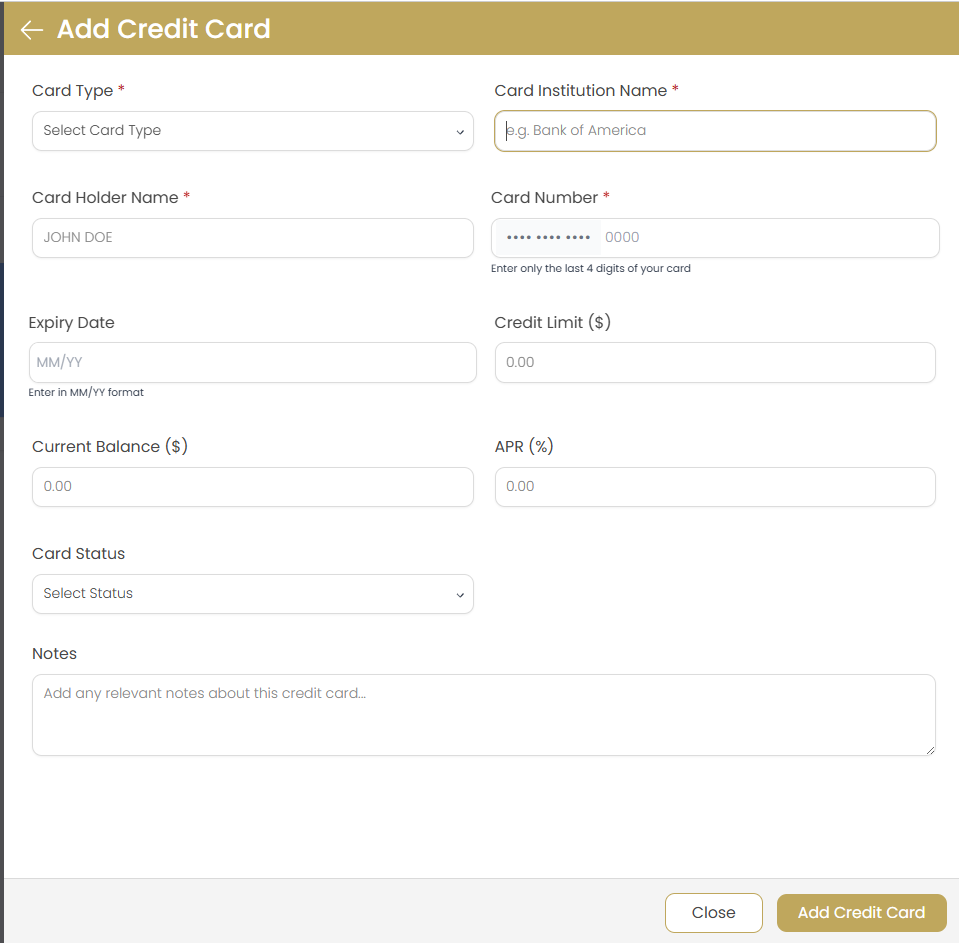
Adding a New Credit Card
Access Payment Methods
Navigate to Settings > Payment Methods in the main menu.
Add New Card
Click the button.
Enter Card Details
Fill in all required card information: number, expiration date, CVV, and cardholder name.
Add Billing Information
Enter the billing address associated with the credit card.
Set Card Preferences
Choose card type (Business/Personal), add nickname, and set as default if needed.
Save and Verify
Save the card and complete verification if required.
Security Notice
All credit card information is encrypted and stored securely in compliance with PCI DSS standards. Agent Teammate CRM never stores your complete card number on our servers.
Supported Card Types
- Visa
- Mastercard
- American Express
- Discover
- Business credit cards
- Corporate cards
- Debit cards (where supported)
Managing Credit Cards
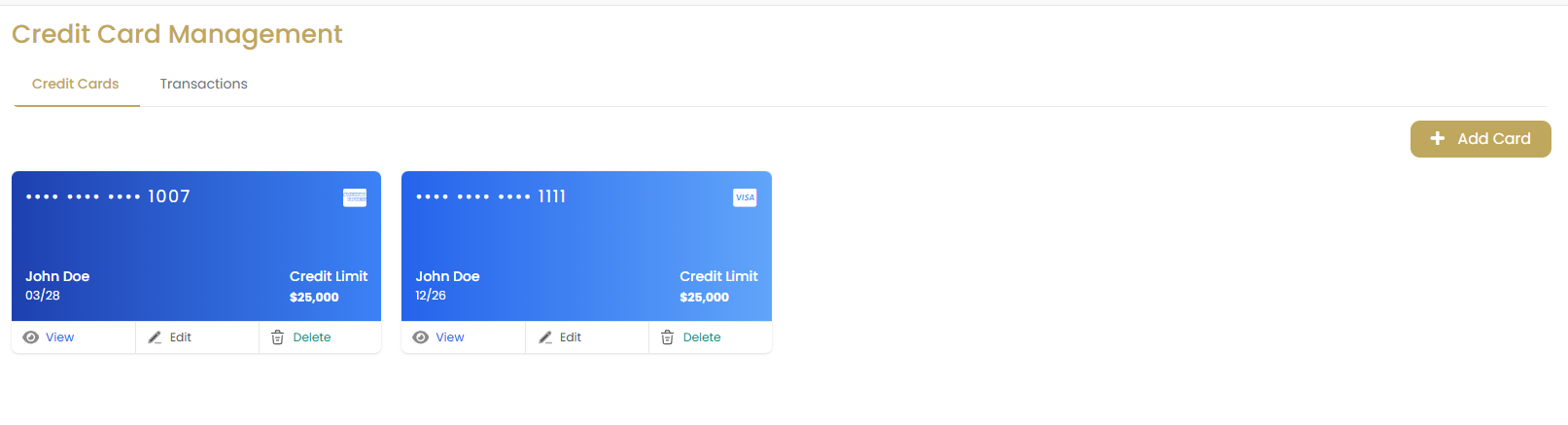
Card Management Options
- View Cards: See all stored credit cards with masked numbers
- Edit Information: Update expiration dates and billing addresses
- Set Default: Choose which card to use by default
- Deactivate Cards: Temporarily disable cards without deleting
- Delete Cards: Permanently remove cards from the system
- Rename Cards: Add nicknames for easy identification
Editing Credit Card Information
Access Payment Methods
Navigate to Settings > Payment Methods in the main menu.
Find and Edit
Locate the card you want to edit and click the "Edit" button.
Update Information
Modify the information you need to change (expiration, address, etc.).
Re-enter Security Code
For security, you may need to re-enter the CVV code.
Save Changes
Save your changes and verify the update was successful.
Organization Tips
- Use clear nicknames like "Business Amex" or "Personal Visa"
- Keep business and personal cards clearly separated
- Regularly review and remove expired cards
- Update expiration dates before cards expire
Transaction Tracking
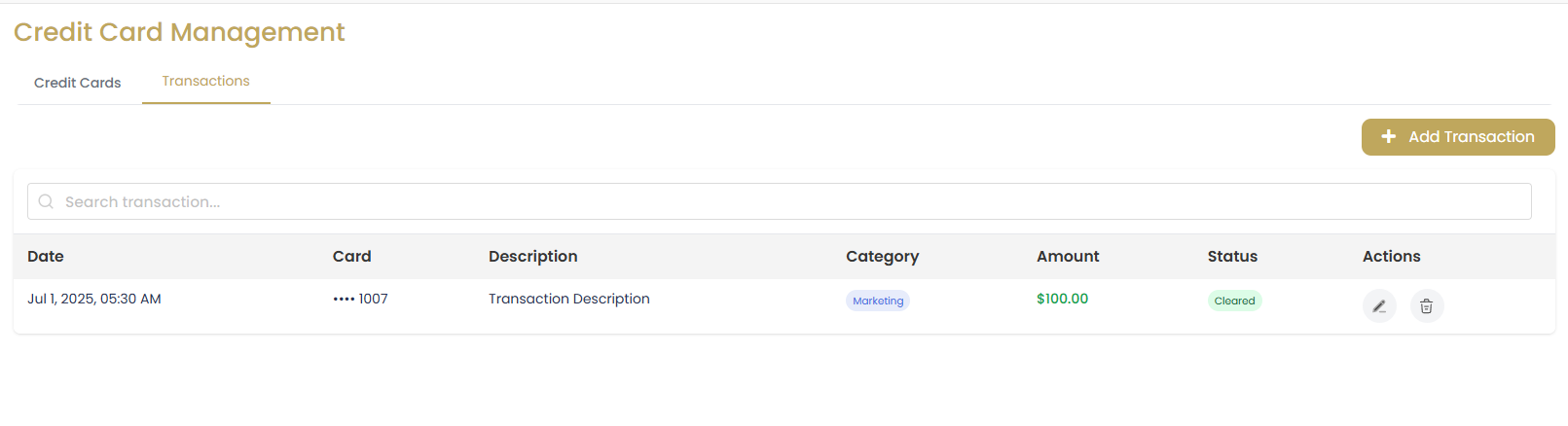
Transaction Information
- Transaction Date: When the transaction occurred
- Amount: Transaction amount and currency
- Merchant: Business or vendor name
- Category: Expense category assignment
- Reference Number: Transaction ID for tracking
- Status: Pending, completed, or failed
- Receipt: Linked receipt or documentation
Viewing Transaction History
Access Transactions
Navigate to Finance > Credit Card Transactions.
Set Date Range
Select the date range you want to view.
Filter Results
Choose specific cards or apply filters by amount, category, or merchant.
Review Transactions
Click on individual transactions for detailed information.
Automatic Synchronization
- Connect to your credit card accounts for automatic transaction import
- Transactions are categorized automatically based on merchant
- Duplicate detection prevents double-entry
- Real-time updates when new transactions occur
- Reconciliation tools to match imported transactions
Security Features
Security Measures
- PCI Compliance: Meets all PCI DSS requirements
- Encryption: All data encrypted in transit and at rest
- Tokenization: Card numbers are tokenized for security
- Access Control: Role-based access to payment features
- Audit Trail: Complete log of all payment activities
- Fraud Detection: Automatic monitoring for suspicious activity
- Two-Factor Authentication: Additional security for sensitive operations
Security Best Practices
- Never share your payment credentials with others
- Use strong, unique passwords for your account
- Enable two-factor authentication
- Regularly review transaction history
- Report suspicious activity immediately
- Keep your browser and devices updated
- Log out when finished using the system
Data Protection
Your credit card information is protected by bank-level security. We partner with certified payment processors to ensure your financial data is always secure.
Expense Integration
Automatic Expense Creation
- Credit card transactions automatically create expense entries
- Expenses are categorized based on merchant and transaction type
- Business rules can be set up for automatic categorization
- Integration with receipt scanning for documentation
- Mileage tracking integration for travel expenses
Setting Up Expense Integration
- Go to Settings > Integrations > Credit Cards
- Enable "Automatic Expense Creation"
- Set up categorization rules
- Configure which cards should create expenses
- Set minimum amounts for expense creation
- Choose default expense categories
- Save integration settings
- Test with a small transaction
Integration Benefits
- Eliminates manual expense entry
- Reduces errors and duplicate entries
- Ensures all business expenses are captured
- Provides complete financial picture
- Simplifies tax preparation and reporting
Best Practices
Financial Management
- Separate business and personal credit card expenses
- Regularly reconcile credit card statements
- Keep digital receipts for all business expenses
- Review transactions weekly for accuracy
- Set up alerts for large or unusual transactions
- Use business credit cards for all business expenses
Security Practices
- Never store credit card information outside the CRM
- Use secure networks when accessing payment features
- Enable all available security features
- Monitor accounts regularly for fraud
- Update expired cards promptly
- Use different cards for different purposes
Compliance Requirements
- Follow your company's credit card policies
- Maintain proper documentation for tax purposes
- Understand merchant category codes for expenses
- Report business expenses according to IRS guidelines
- Keep records for the required retention period
Troubleshooting
Common Issues
Q: My credit card was declined
A: Check that the card information is correct, including expiration date and CVV. Verify that the card has sufficient credit limit and hasn't been blocked by your bank.
Q: Transactions are not syncing automatically
A: Check your connection settings and ensure you've authorized access to your credit card account. Try disconnecting and reconnecting the integration.
Q: I can't add a new credit card
A: Ensure you're using a supported card type and that all required fields are filled correctly. Check that your account has permission to add payment methods.
Q: Duplicate transactions are appearing
A: This can happen if you manually enter expenses that were also imported automatically. Use the duplicate detection feature to merge or remove duplicate entries.
Q: I need to dispute a transaction
A: Contact your credit card company directly to dispute transactions. The CRM can provide transaction details and documentation to support your dispute.