Profile Management
Complete guide to managing user profiles, account settings, security, and access monitoring
Overview
The Profile Management system provides comprehensive control over user account information, security settings, and access monitoring. This centralized interface allows administrators and users to maintain accurate profile information, secure account access, and monitor login activity across multiple devices and sessions.
Security and Privacy
Profile management includes critical security features to protect user accounts and maintain data privacy. All changes are logged and monitored for security purposes.
- Complete profile information management
- Email verification and multi-email support
- Password security and reset functionality
- Active session monitoring and control
- Login history and security auditing
User Information Management
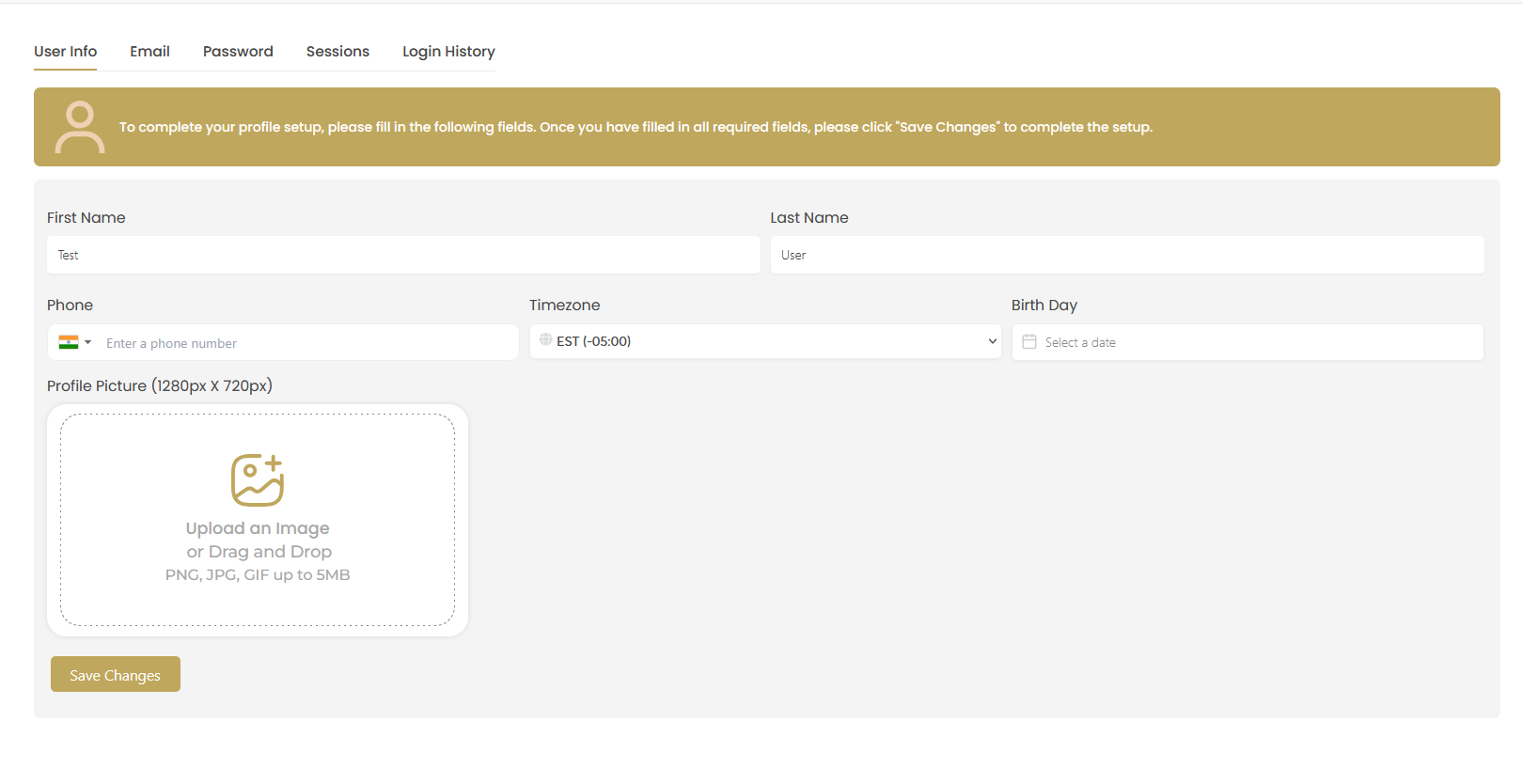
The User Info tab provides a comprehensive interface for managing personal profile information, contact details, and account preferences.
Profile Setup and Completion
Access Profile Settings
Navigate to your profile settings to access the User Info tab, which displays all personal information fields.
Complete Required Fields
The system displays a prominent notification banner for incomplete profiles:
- Setup Reminder: "To complete your profile setup, please fill in the following fields"
- Save Action: Click "Save Changes" once all required fields are completed
- Profile Completion: All fields must be filled for full profile activation
Profile Completion Required
Incomplete profiles may have limited access to certain features. The system will display reminder notifications until all required information is provided.
Personal Information Fields
| Field | Description | Requirements |
|---|---|---|
| First Name | User's first/given name | Required field for profile completion |
| Last Name | User's last/family name | Required field for profile completion |
| Phone | Contact phone number with country code | International format with country selector |
| Timezone | User's local timezone (e.g., EST (-05:00)) | Affects scheduling and time displays |
| Birth Day | Date of birth selection | Optional field with date picker |
| Profile Picture | User avatar image (1280px X 720px) | PNG, JPG, GIF up to 5MB |
Profile Picture Upload
Image Upload Options
The profile picture section supports multiple upload methods:
- Upload Button: Click "Upload an Image" to browse files
- Drag and Drop: Drag image files directly to the upload area
- File Formats: Supports PNG, JPG, GIF formats
- Size Limit: Maximum file size of 5MB
Image Specifications
For optimal display, profile pictures should meet these specifications:
- Recommended Size: 1280px × 720px for best quality
- Aspect Ratio: System will automatically resize if needed
- Format Support: PNG (best quality), JPG, or GIF
Profile Management Tips
- Complete Setup: Fill all required fields to unlock full platform features
- Phone Format: Use the country code selector for proper international formatting
- Timezone Accuracy: Correct timezone ensures proper scheduling and notifications
- Professional Image: Use a clear, professional profile picture for business interactions
Email Management
The Email tab provides comprehensive management of primary and additional email addresses, including verification processes and email change procedures.
Primary Email Configuration
Primary Email Status
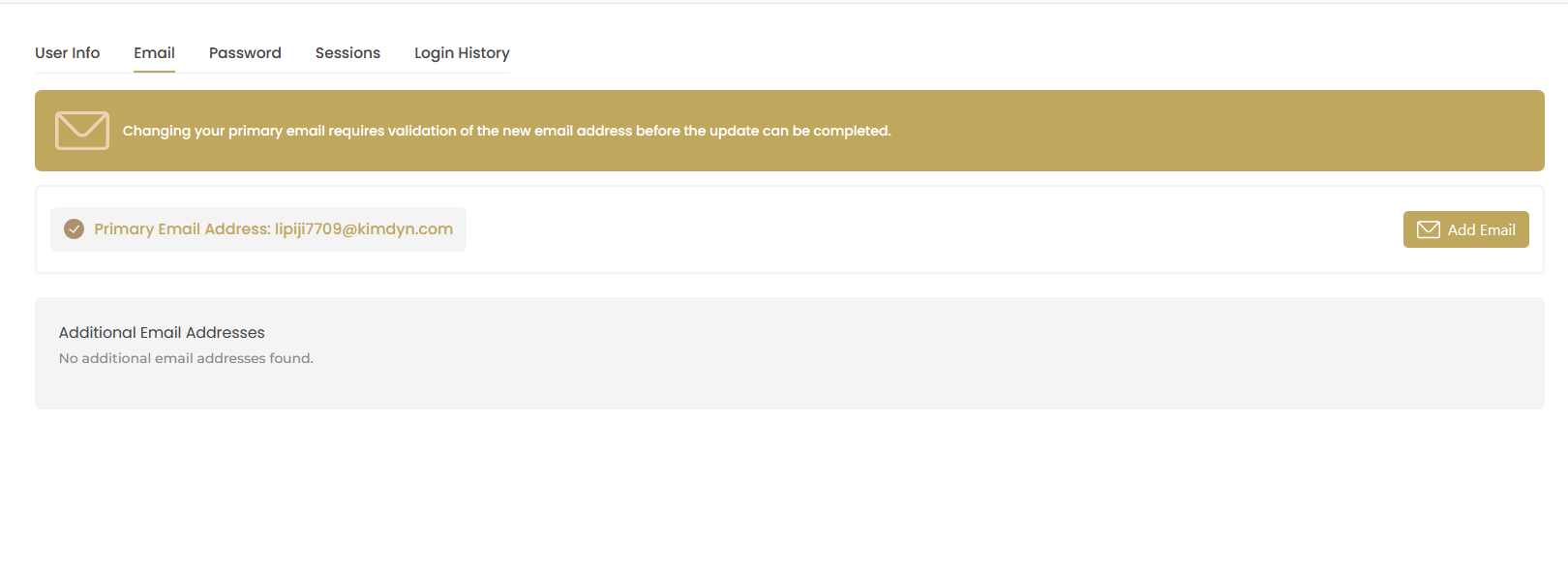
The system displays your current primary email address with verification status:
- Verified Status: Checkmark icon indicates verified email
- Email Display: Shows current primary email (e.g., lipij7709@kimdyn.com)
- Change Process: Email changes require verification before activation
Email Change Verification
When changing your primary email, the system implements a security verification process:
Verification Required: "Changing your primary email requires validation of the new email address before the update can be completed."
Additional Email Addresses
Adding Secondary Emails
Use the button to include additional email addresses:
- Multiple Emails: Support for multiple verified email addresses
- Verification Process: Each additional email requires verification
- Management Options: Edit or remove additional emails as needed
Email Address Display
The Additional Email Addresses section shows:
- Current Status: "No additional email addresses found" when none are configured
- Address List: All additional verified email addresses
- Management Controls: Options to edit or remove each address
Email Security
All email changes and additions require verification to ensure account security. Verification emails are sent immediately upon request and contain time-limited activation links.
Password Security
The Password tab provides secure password management including password changes, strength requirements, and password reset functionality.
Password Change Process
Password Reset Option
For users who don't remember their current password:
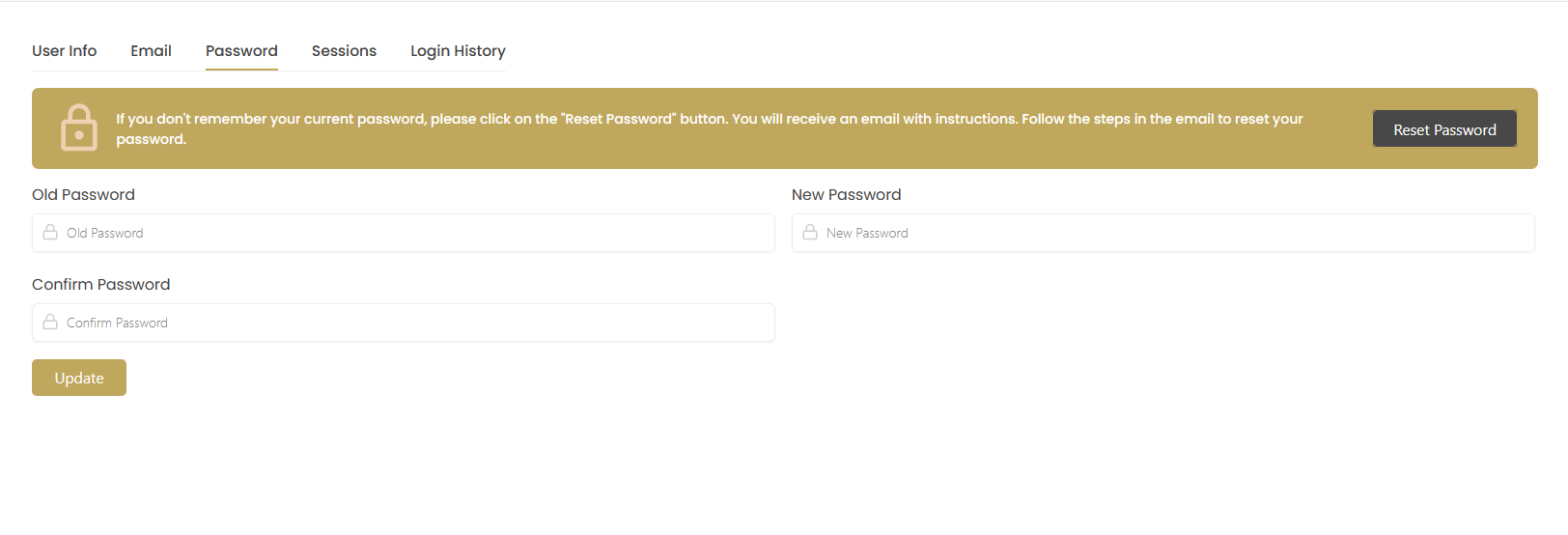
Reset Instructions: "If you don't remember your current password, please click on the 'Reset Password' button. You will receive an email with instructions. Follow the steps in the email to reset your password."
Click to initiate the email-based reset process.
Manual Password Change
For users who know their current password, use the standard change process:
- Old Password: Enter your current password for verification
- New Password: Create a new secure password
- Confirm Password: Re-enter the new password to confirm
- Update Action: Click to save changes
Password Requirements
| Requirement | Description | Security Benefit |
|---|---|---|
| Length | Minimum 8 characters recommended | Longer passwords are more secure |
| Complexity | Mix of uppercase, lowercase, numbers, symbols | Increases resistance to attacks |
| Uniqueness | Different from previous passwords | Prevents reuse of compromised passwords |
| Personal Info | Avoid using personal information | Prevents social engineering attacks |
Password Security Tips
- Strong Passwords: Use a combination of letters, numbers, and special characters
- Password Managers: Consider using a password manager for unique, strong passwords
- Regular Updates: Change passwords periodically, especially after security incidents
- Two-Factor Authentication: Enable additional security measures when available
Session Management
The Sessions tab provides real-time monitoring and control over active login sessions across all devices and locations.
Active Session Monitoring
Session Overview
The sessions interface displays important security information:
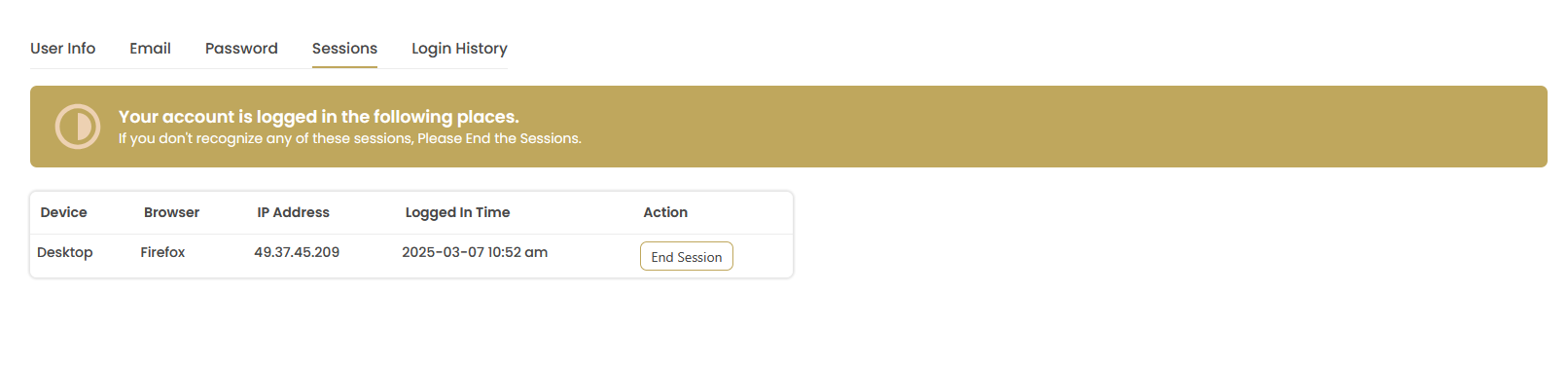
Security Alert: "Your account is logged in the following places. If you don't recognize any of these sessions, Please End the Sessions."
Session Details
Each active session displays comprehensive information:
- Device Type: Desktop, Mobile, Tablet identification
- Browser: Firefox, Chrome, Safari, etc.
- IP Address: Location identifier (e.g., 49.37.45.209)
- Login Time: When the session was established (e.g., 2025-03-07 10:52 am)
- Action Controls: End Session button for each session
Session Security Controls
| Information | Purpose | Security Action |
|---|---|---|
| Device | Identify the type of device used | Verify expected device types |
| Browser | Show the browser application | Confirm known browser usage |
| IP Address | Geographic location indicator | Verify expected locations |
| Logged In Time | When the session was created | Identify unexpected login times |
| End Session | Terminate suspicious sessions | Immediate security response |
Ending Suspicious Sessions
Identify Suspicious Activity
Review session details for signs of unauthorized access:
- Unknown Locations: IP addresses from unexpected geographic areas
- Unfamiliar Devices: Device types you don't own or use
- Unusual Times: Login times when you weren't active
- Multiple Sessions: More active sessions than expected
Terminate Sessions
Click for any suspicious or unrecognized sessions to immediately terminate access.
Security Best Practices
- Regular Monitoring: Check active sessions regularly for unauthorized access
- Immediate Action: End any unrecognized sessions immediately
- Password Change: Change your password if suspicious activity is detected
- Report Issues: Contact support for persistent security concerns
Login History
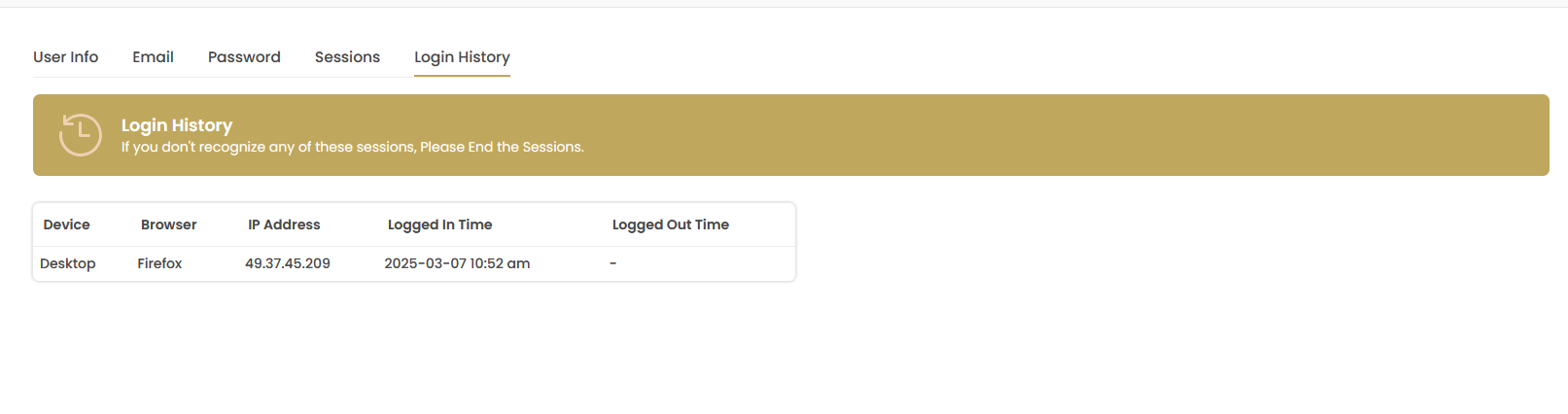
The Login History tab provides a comprehensive audit trail of all account access attempts and successful logins for security monitoring and compliance purposes.
Login History Overview
Security Monitoring
The login history provides essential security information:
Security Notice: "If you don't recognize any of these sessions, Please End the Sessions."
Historical Data Display
The login history table shows detailed information for each access attempt:
- Device Type: Desktop, Mobile, Tablet classification
- Browser Used: Specific browser application (Firefox, Chrome, etc.)
- IP Address: Network location of the access attempt
- Logged In Time: Timestamp of successful login
- Logged Out Time: Session end time (or dash if still active)
Login History Analysis
| Column | Information Provided | Security Value |
|---|---|---|
| Device | Type of device used for access | Identify unauthorized device types |
| Browser | Browser application used | Track application preferences and changes |
| IP Address | Network location identifier | Geographic access pattern monitoring |
| Logged In Time | Session start timestamp | Access timing pattern analysis |
| Logged Out Time | Session end timestamp or active status | Session duration monitoring |
Security Pattern Recognition
Normal Access Patterns
Establish baseline patterns for your typical usage:
- Regular Devices: Consistent device types you normally use
- Standard Locations: IP addresses from your usual locations
- Typical Times: Your normal login hours and patterns
- Session Duration: How long you typically stay logged in
Anomaly Detection
Watch for unusual patterns that may indicate security issues:
- Geographic Anomalies: Logins from unexpected countries or regions
- Time Anomalies: Access at unusual hours
- Device Changes: New or different device types
- Rapid Succession: Multiple quick logins from different locations
Login History Best Practices
- Regular Review: Check login history weekly for security monitoring
- Pattern Awareness: Know your normal access patterns and locations
- Quick Response: Investigate any unrecognized access immediately
- Documentation: Keep notes of legitimate travel or location changes
- Security Reporting: Report suspicious patterns to security team
Security and Compliance
Profile management includes comprehensive security features and compliance measures to protect user data and maintain system integrity.
Data Protection
Privacy and Security Measures
- Data Encryption: All profile data is encrypted in transit and at rest
- Access Logging: All profile changes and access attempts are logged
- Verification Requirements: Email changes require verification
- Session Security: Automatic session timeout and monitoring
- Audit Trail: Complete history of profile modifications
Compliance Features
| Feature | Purpose | Compliance Benefit |
|---|---|---|
| Login History | Track all access attempts | Audit trail for security compliance |
| Session Monitoring | Real-time access control | Immediate response to security threats |
| Email Verification | Confirm identity for changes | Prevent unauthorized account modifications |
| Password Security | Strong authentication requirements | Meet industry security standards |
Security Responsibilities
User Responsibilities: Users are responsible for maintaining secure passwords, monitoring their sessions, and reporting suspicious activity. System Responsibilities: The system provides tools and monitoring capabilities, but users must actively engage with security features.